HyperWare-II Software
Graphical Programming, Real-Time Trending and Communications software for the IntelliLogger instrument family
| HyperWare-II Key Features | |
|---|---|
| Supporting software for the IntelliLogger Instrument family | |
| Easy to learn, Intuitive icon-based drag and drop programming | |
| Simple setup of data acquisition, reporting and alarming routines | |
| Supports real-time trending of Intellilogger sampled and calculated readings | |
| Data downloads from IntelliLogger memory to standard CSV file formats | |
| Supports USB, LAN, Cell Modem and dial-up modem communications |
Product Information
Overview
HyperWare-II™ (HW-II) is a powerful multi-purpose software package for use with the Logic Beach Network Enabled IntelliLogger and the IL-Mini data logger data logging instrument families. HyperWare-II™ is the next generation icon-based data logging software built upon the original industry-preferred HyperWare program and contains all the functions required for configuration and use of the IntelliLogger.
With HW-II you can graphically build data logging programs that execute in the IntelliLogger, view real-time data from IntelliLoggers while they are executing, build custom web pages, download data and much more. With its intuitive interface and quick to learn graphic programming, you will be amazed at the power and ease of use of HyperWare-II™.
Functions available within HyperWare-II include:
- Easy drag and drop icon-based programming of IntelliLogger instruments
- Viewing real-time data from a connected IntelliLogger
- Configure and use various types of communication links to a local or remote IntelliLogger
- Download logged data from the IntelliLogger memory
- Plot downloaded data with integral plotter and/or save to Excel compatible CSV file
HyperWare-II is provided FREE with the network enabled IntelliLogger instruments and for a nominal charge for the IL-Mini™ family.
Programmability
The IntelliLogger™ instrument is fully programmable for intelligent data logging strategies, automatic reporting, alarming, conditional logging, inter-channel calculations, log to memory on change, statistical calculations and much more. In the early 1990s Logic Beach developed a revolutionary and unique graphical programming method for our instruments called HyperNet™. This programming method has been refined and improved to produce one of the easiest and most powerful programming environments for data logging, reporting and alarming instrumentation.
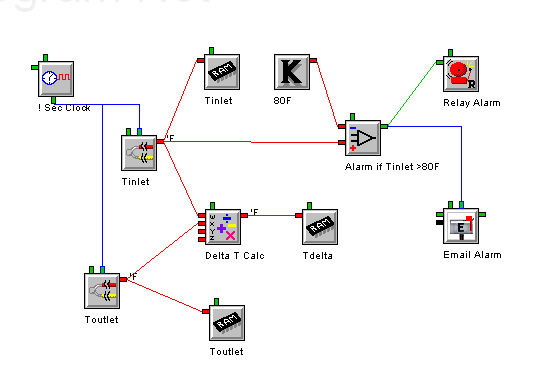
Unlike most stand-alone data acquisition instruments, the IntelliLogger™ is an extremely versatile instrument in that it can be user configured to perform simple to complex data acquisition and reporting strategies. To program an IntelliLogger™, icons are added to the workspace, configured and inter-connected with a mouse to indicate program flow. This program is then uploaded to the IntelliLogger™ memory where it executes stand-alone.
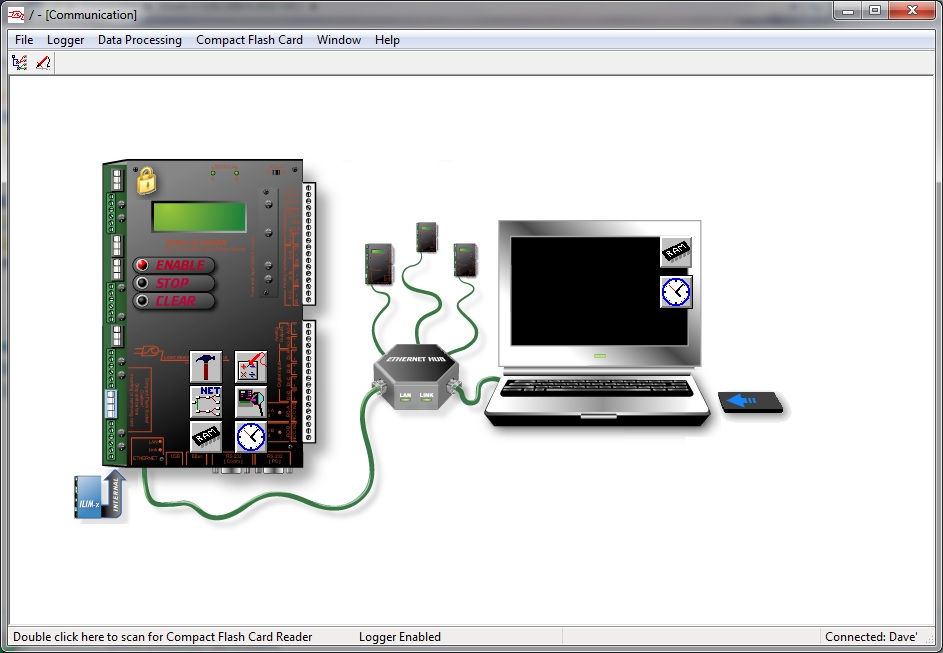
1. Establish a connection between the PC and the IntelliLogger™
NOTE: USB, Ethernet, Cellular Modem, dial-up modem are all supported.
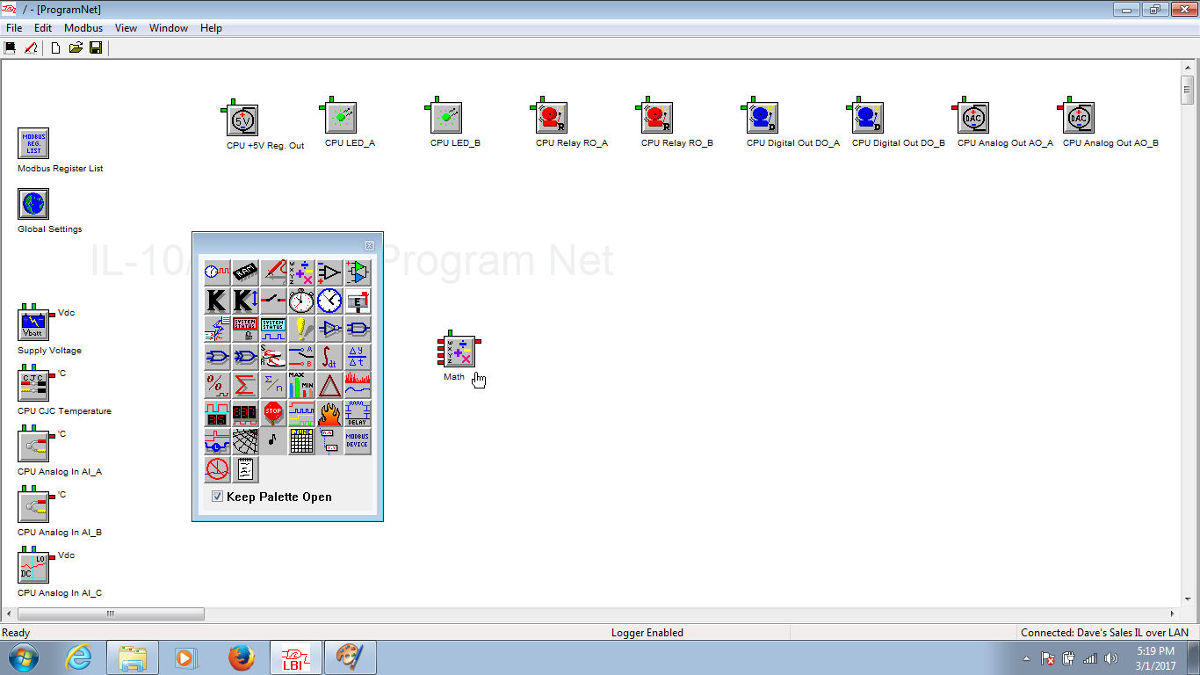
2. Switch to the Programming Window and Query the IntelliLogger for its current hardware configuration
The programming window will populate with icons representing the inputs and outputs available in the connected IntelliLogger™
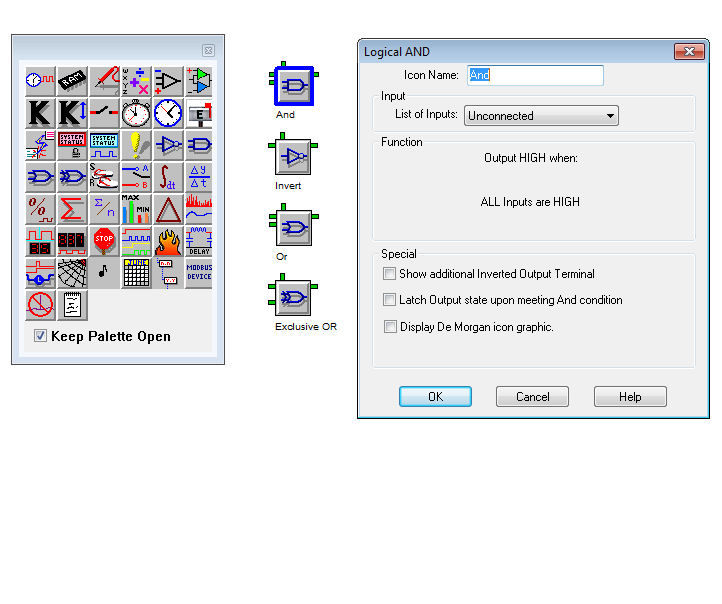
3. Drag additional icons onto the workspace from the Icon Palette. The palette contains icons representing various functions from Sampling Rate Clocks to Math to Summations to Alarm Comparators to Logic to Logger Memory and more.
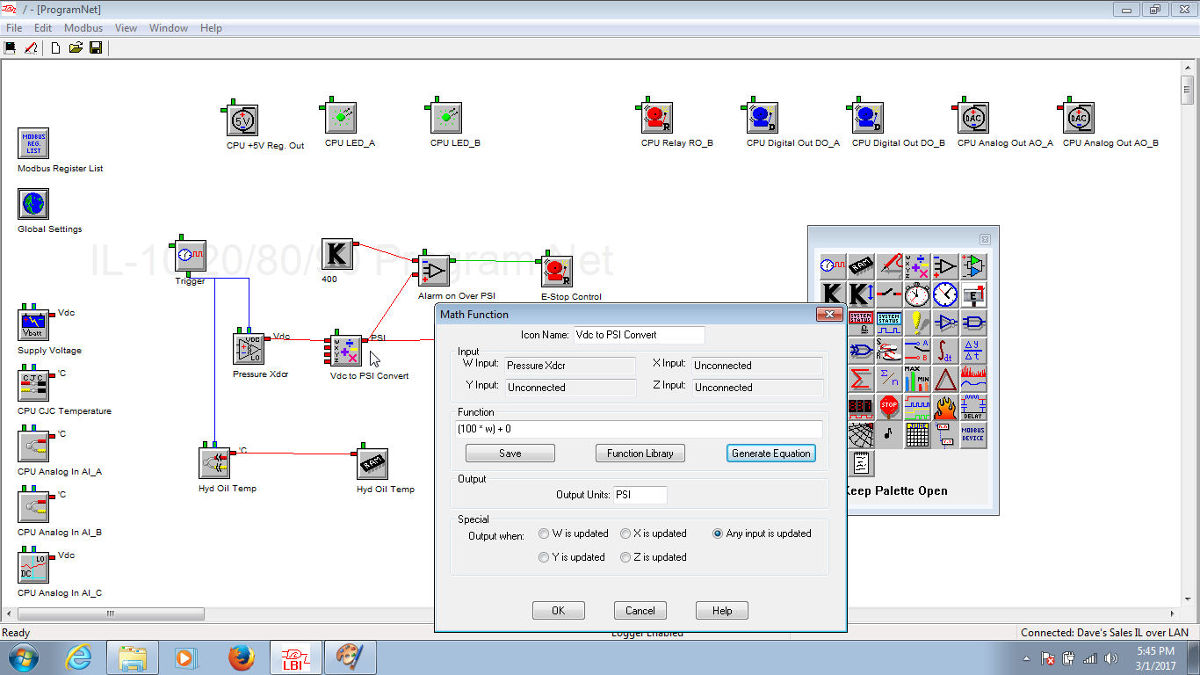
Click on the icons to define their operation with equations, ranges, units, etc. The mouse is then used to interconnect the icons to indicate the data flow.
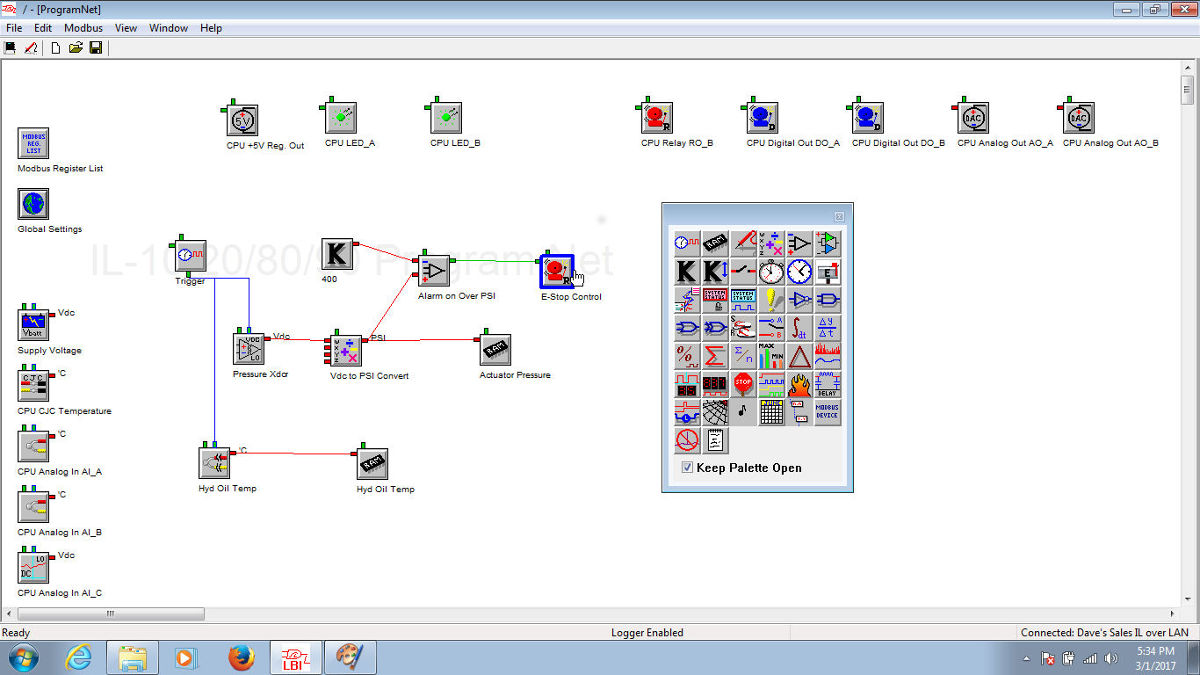
Click on the icons to define their operation with equations, ranges, units, etc. The mouse is then used to interconnect the icons to indicate the data flow.
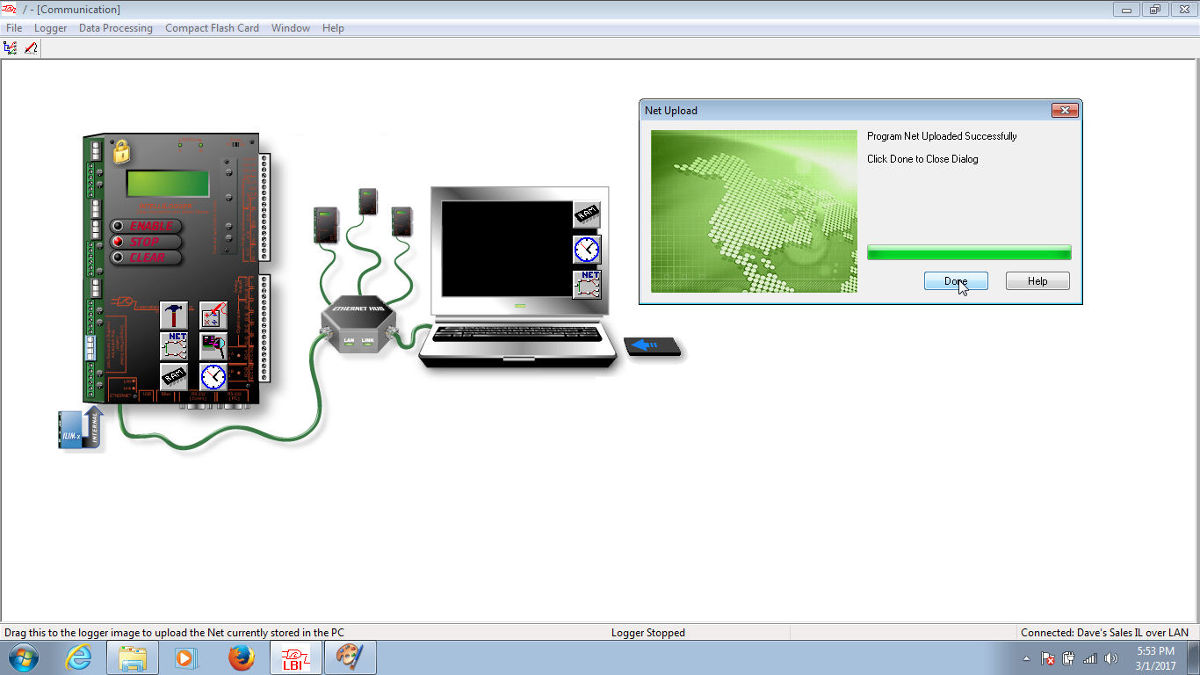
4. Upload the completed HyperNet™ program to the IntelliLogger™ memory
NOTE: Automatic error checking is done during the upload process.
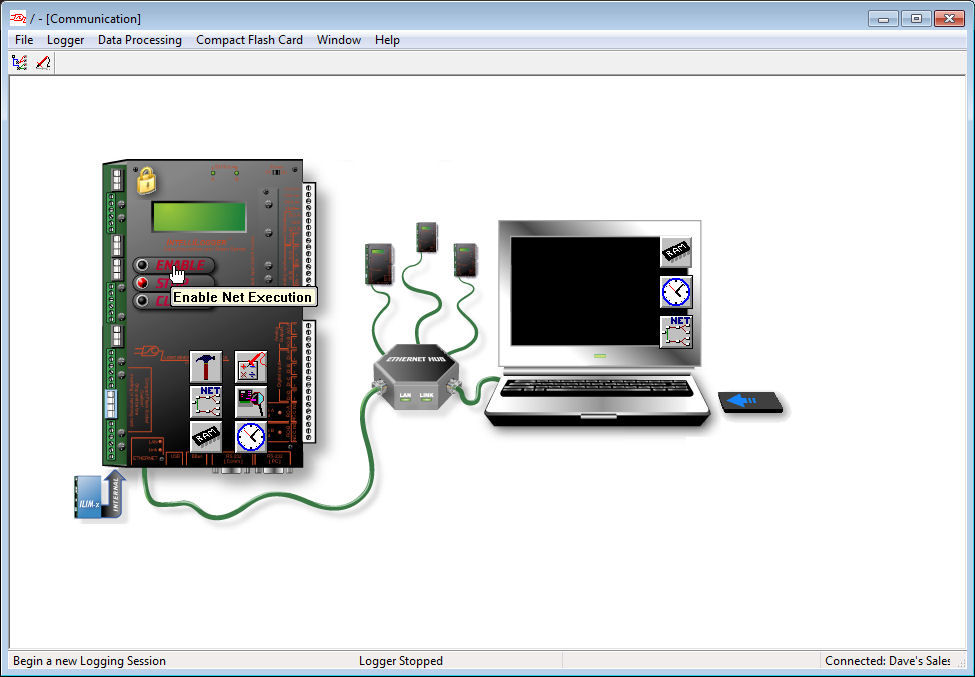
5. Enable the InteliLogger™ via it’s front panel buttons or from within HyperWare-II™
The IntelliLogger™ will start executing the program peforming intelligent sampling of inputs, math, logic, integration, alarm outputs and other functions based on the user built HyperNet™ program.
Real-Time Trending
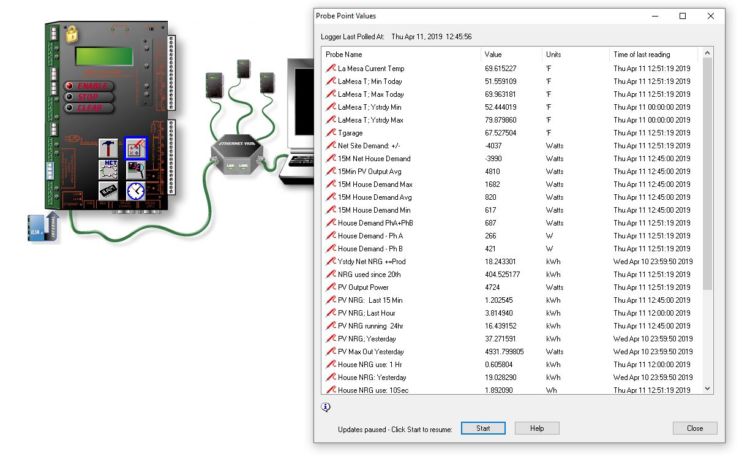
Monitoring of current input values and output states is readily performed by using any of the Real-Time Trending features integral to HyperWare-II. Establish a connection to an IntelliLogger™ and current values can simply be viewed using the Quick Probes view from the HyperWare-II Communication window. Simply drag the Quick Probes icon from the IntelliLogger™ graphic to the PC graphic and a dialog opens with current values.
For a “dashboard” view of desired real-time values, a custom annunciator panel display can be quickly built. A few quick steps will result in a custom display that can be saved for reuse.
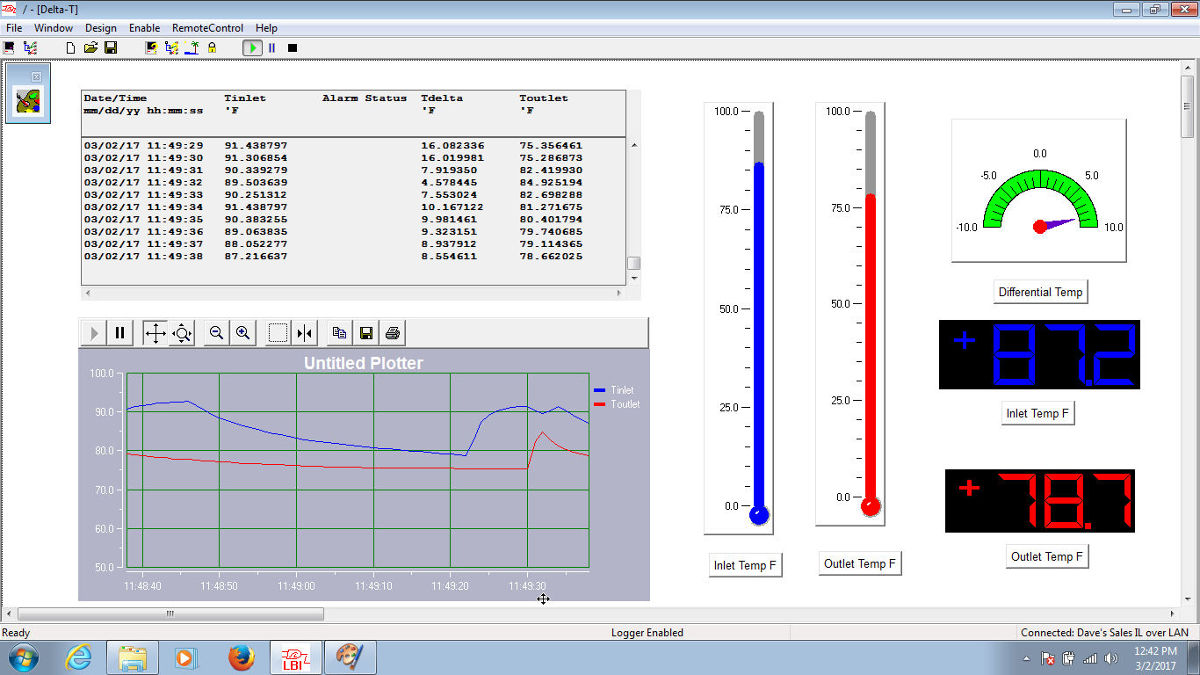
1. Open the Real-Time Trending window within HyperWare
2. Drag the desired objects off of the palette. Display objects ranging from simple thermometers to gauges to line plots and tabular charts are available on the palette.
3. Click on each object, set display colors, ranges and other parameters as desired and associate the IntelliLogger™ channels to be displayed in that object
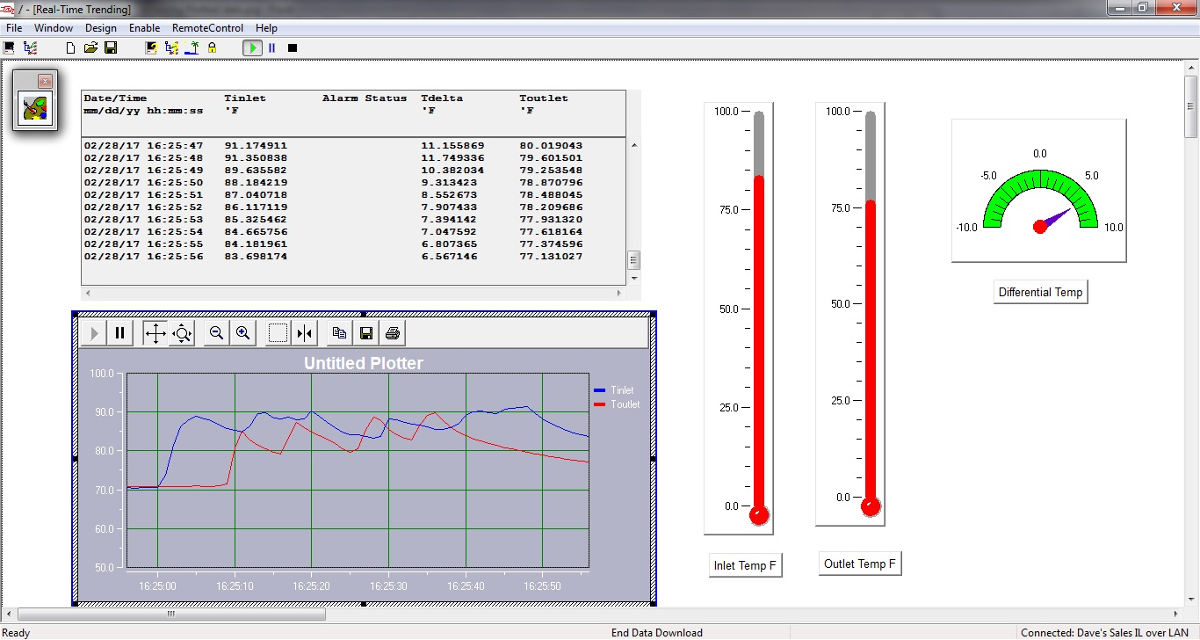
4. Click “Run” and the objects will be updated as the IntelliLogger™ sends current values to HyperWare-II during its normal execution
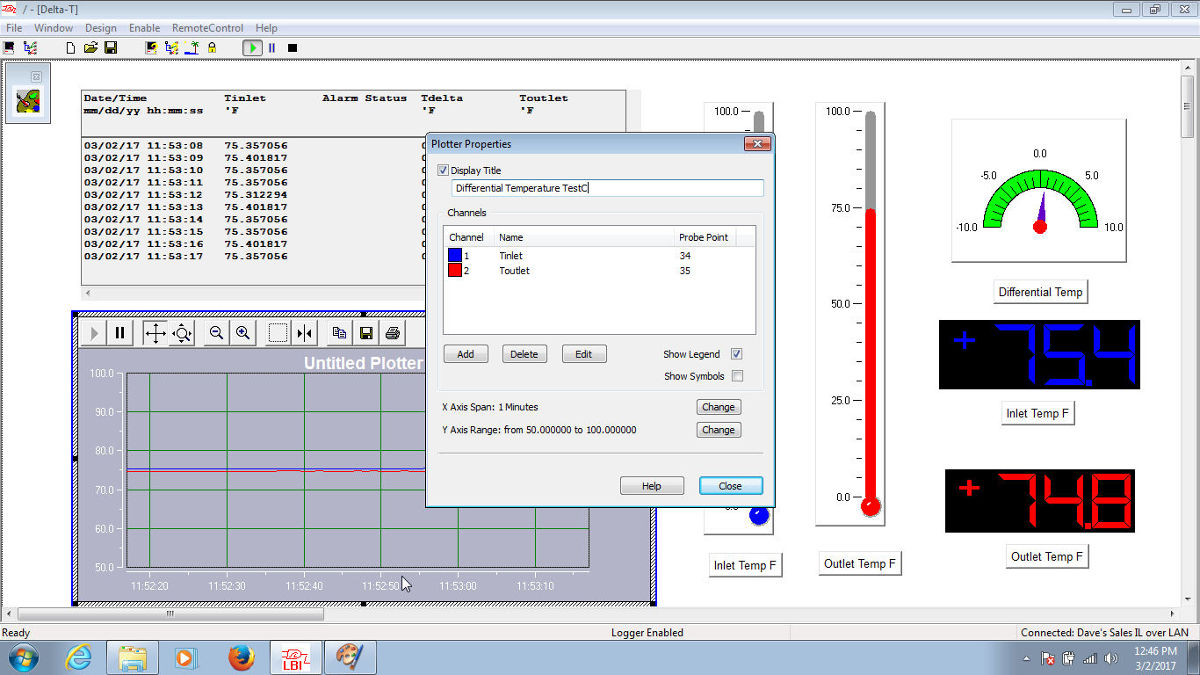
Real-time values on a network connected logger can be viewed using any browser by navigating to the Current Values and Control tab served by the IntelliLogger™ integral Web Server.
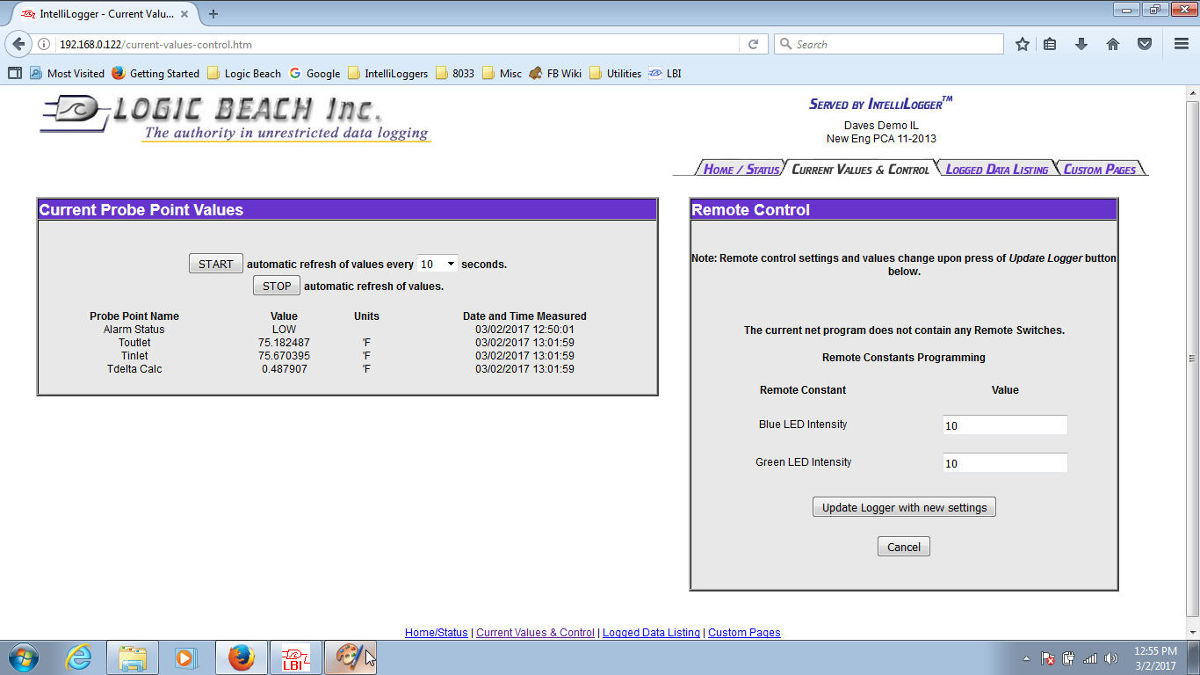
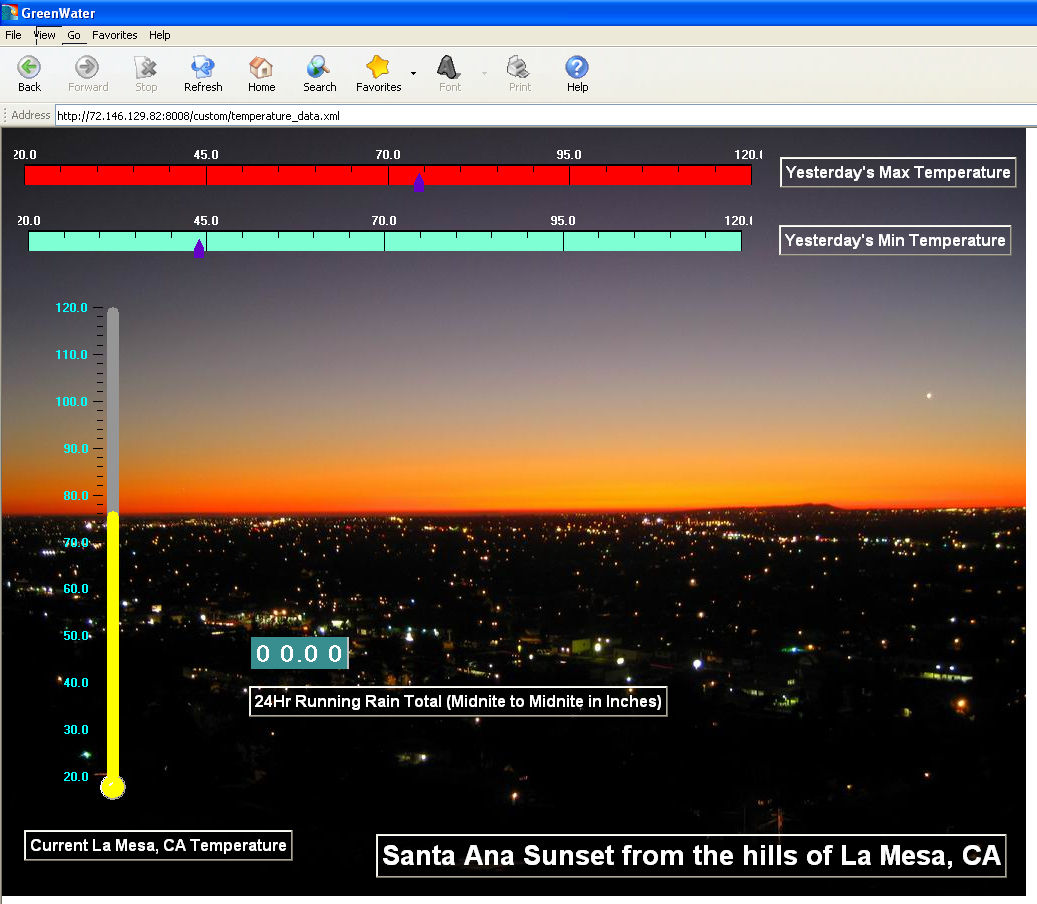
Additionally, custom Web Pages can also be built within HyperWare, uploaded to the IntelliLogger™ memory and then viewed using the Logic Beach GreenWater browser. These custom pages are built similarly as done in the Real-Time Trending feature above… resulting in a custom dashboard display.
Communications
Communication operations are graphically displayed and performed with a mouse. To perform a data download, simply drag the Logged Data Memory icon overlaying the ILL to the PC and the data download will commence. Status queries, Quick Probe real-time data display, Program Net upload to the ILL and more are all intuitively performed by dragging icons between the the PC and ILL graphics.
Data Download
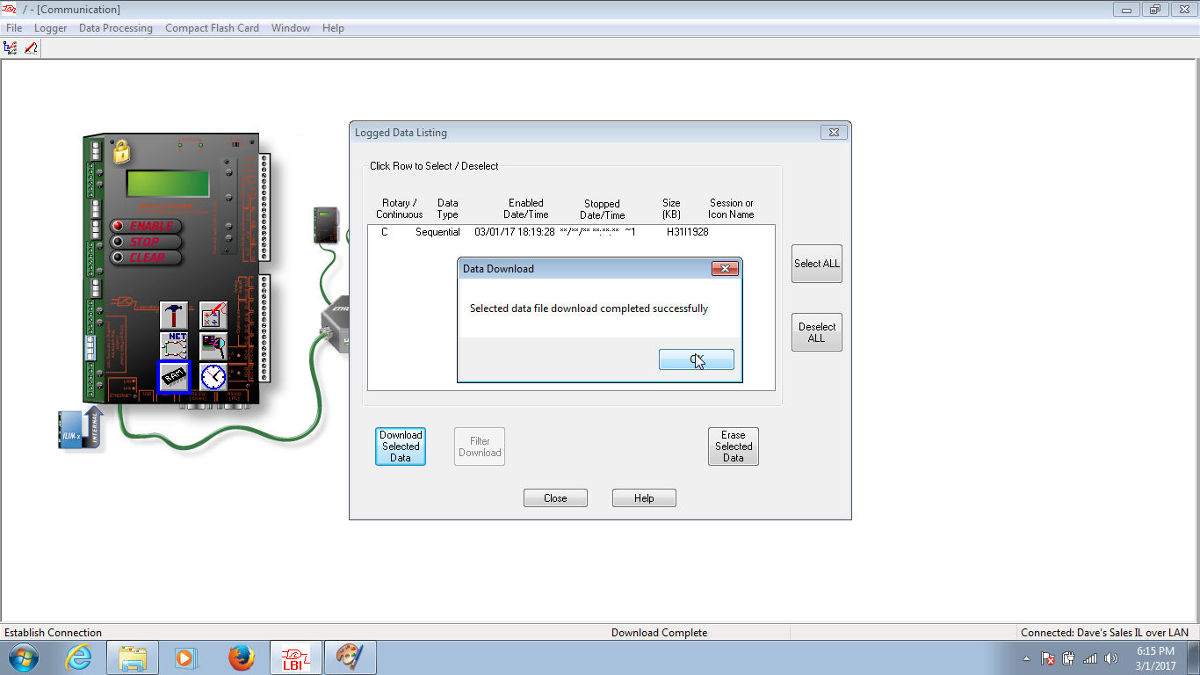
The core function of using the ILL data acquistion instrument is to collect data from connected sensors and signals over time. Once the data is in the ILL memory, the data is simply downloaded to the PC by dragging the Memory icon from the ILL graphic to the PC graphic. A Save As dialog opens where the path, filename and file type are user specified. Files can be saved as CSV (commonly used for opening in Excel and other 3rd party applications), text and compressed raw binary file formats. Downloaded data can be viewed in the integral HWW plotter or opened with Excel for review and/or further manipulation.
Data Plotter
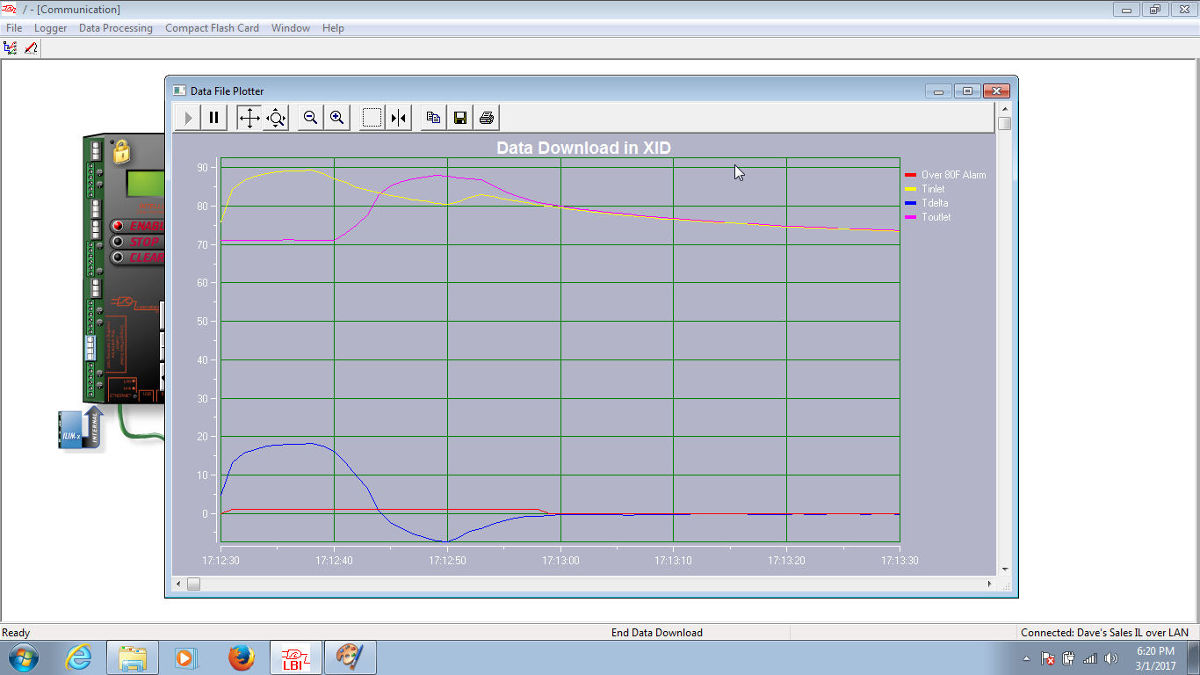
A powerful multi-channel Data Plotter is included with HyperWare for quickly plotting of downloaded data.
Frequently Asked Questions
Overview
- What is HyperWare-II?
- HyperWare-II is a unique application developed by Logic Beach for programming and communicating with Logic Beach IntelliLogger data acquisition, alarming and reporting instruments.
- It is a graphic icon-based program that makes communicating and programming the IntelliLogger very intuitive, therefore minimizing the learning curve. Learning to write lines of code is completely avoided.
- What are the functions of HyperWare-II?
- Communication with the instrument
- Development of a Program for upload into the IntelliLogger memory where it executes
- Logged data transfer to a PC
- Real-time trending of data via a custom dashboard
- Plotting of downloaded data
- Downloaded data file conversion
Communications:
- What types of communication with the IntelliLogger instruments are supported?
- Ethernet, USB, PSTN Analog Modem and RS-232 (note that the IL-Mini instrument only supports USB)
- Can repetitive communications be automated?
- Yes. Using Email and/or FTP functions within the data logger program allows automated transfer of data based on time and/or events. For example, a daily FTP of logged data to a remote FTP Server can be automatically performed. Additionally, logged data can be attached to emails.
Icon Based Programming:
- Is instrument programming with HyperWare-II really as simple as Logic Beach claims?
- Yes we believe so, as do thousands of our customers.
- There is a basic learning curve but learning core programming skills is quick and intuitive. The novel concept that makes the learning process so quick is that instead of writing lines of code or esoteric commands, programming is performed visually by dragging icons onto the workspace and interconnecting them with your mouse to represent the data flow.
- A secondary advantage to this programming method is that the programs can be easily understood
at a later date by simple visual inspection.. no interpretation of complex code is required.
- What are the basic steps to building an IntelliLogger program?
- Connect to the instrument
- Query the instrument for its current hardware configuration
- Drag and drop icons representing inputs, outputs and processing functions into the workspace and interconnect them with your mouse.
- Click on each icon and setup operational parameters (names, equations, signal ranges, etc)
- Upload the Program Net to the instrument
- What if I need help during this phase?
- Logic Beach has you covered.
- Within the HyperWare-II program is extensive context sensitive help as well as examples… all readily accessible by clicking on the Help button
- Unlike many companies, Logic Beach continues to believe that there is tremendous value for users from a well-organized and detailed User Manual. So, we provide one as a PDF file with HyperWare-II (and also one for the instrument)
- We provide learning videos that quickly give users a grasp of the steps involved
- We have a qualified Technical Support team at Logic Beach that can answer your questions
- Logic Beach has you covered.
- Has programming capability been compromised due to the simplicity of HyperWare-II visual programming?
- No. Well… almost “No”. By writing technical lines of code in a programming language it is possible to implement more complex functions than HyperWare-II can deliver. However, with that said, it is RARE that customers find functions that they are unable to implement using HyperWare-II.
- Also, the time to implement these functions using HyperWare-II is miniscule compared to writing and debugging in-line code. The comparison is hours and days for inline coding vs seconds to minutes for HyperWare-II programming.
- So… just how programmable are Logic Beach data loggers via HyperWare-II ?
- Extremely programmable! Simple to complex data acquisition, alarming and reporting applications
are all easily handled for your application. - Following are a few examples of data acquisition, alarming and reporting functions easily
implemented using HyperWare-II:- FTP data to an FTP server every night at midnight… automatically.
- Send email messages with embedded current values and optionally with data attached to one or multiple addresses based on time, alarm conditions or other triggers.
- Conditional Logging: log a channel to memory only when the temperature is above a threshold and two other digital inputs are ON. Using a Comparator icon, a Constant Icon and a AND Gate Icons comprises this programming scenario.
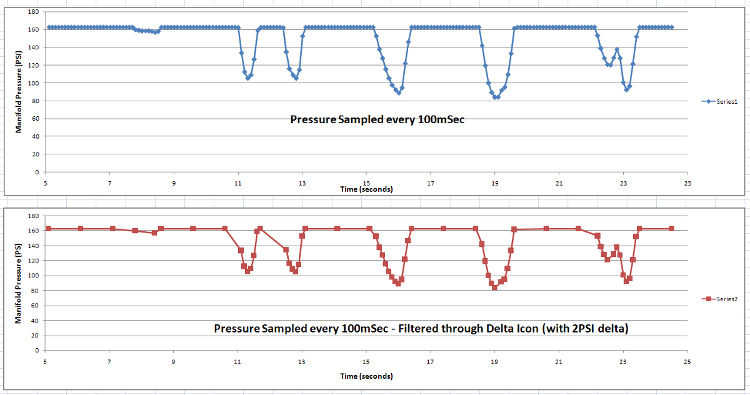
- Delta Logging: only store a channel’s value to memory when it changes by a User- defined amount. This allows for high speed sampling with storage to memory of only the trending data points.
- Scheduled Logging Sessions: use the Scheduler Icon to enable the logger only during the required time periods.
- Simple to complex math ranging from basic Engineering units conversion to inter-channel calculations (for example heat transfer) to time integration (for flow calcs) to signal/sensor linearization and much more. Additionally, user defined specialty equations can be written and saved to a library for reuse.
- Sensor Excitation Control: cycles the power to a sensor or a transmitter just during readings to conserve battery power. Warm-up Icon turns sensor power on before sampling using a user-specified warm-up period.
- Extremely programmable! Simple to complex data acquisition, alarming and reporting applications
Real-Time Data Trending:
- Can data be viewed real-time while the IntelliLogger is executing its program?
- Yes. When connected to a logger, real-time values can be displayed within the Real-Time Tracking Window in HyperWare-II
- Data can be viewed in a number of ways. The most obvious are numerical values and a graphical plot with the x-axis as time. Additionally, there are 20 more data presentation graphics that display information as a user defined Dashboard with objects representing thermometers, LED bar graphs, tanks, pipes, angular gauges, digital readouts and more.
- Can real-time data be viewed on the IntelliLogger directly?
- Yes. Via HyperWare-II, channel display format, automatic scrolling and timing can be configured for real-time data viewing on the LCD integral to the IntelliLogger.
Logged Data Processing and Display:
- How is data downloaded from the IntelliLogger?
- From within the HyperWare-II Communication window, simply drag the icon representing logged data from the data logger graphic over to the PC graphic. Options are presented for filename, file type, etc.
- Can downloaded data be graphically displayed and plotted?
- Yes, once data has been downloaded from the data logger’s memory to a file on your PC, the data can be plotted using the same plotting tool that is used with real-time trending and the web plotter. Plotted files can be saved to a BMP file format, zoomed, scaled, plotted, analyzed, titled and more. There is complete control over the presentation of the plotter.
- If I used a removable compact flash memory card in my logger, how do I transfer the data to my PC?
- Two methods are available:
- The card can be left in the logger and the data can be downloaded from the logger via a standard HyperWare-II communication link between the IntelliLogger and the PC.
- The card can be removed from the logger and transported back to the PC running HyperWare-II. The card is then inserted into a card reader and the file is downloaded to the PC. HyperWare-II can then plot the data immediately or convert the data to one of the standard file types (eg CSV).
- Two methods are available:
Browser Access:
- Can any applications other than HyperWare-II be used to access a network connected IntelliLogger?
- The IntelliLogger has an integral Web Page Server, so any browser can be used to access an IntelliLogger that is connected to a network and/or the Internet.
- What functions are provided via a Browser connection to the IntelliLogger?
- Real-time data can be viewed from any I/O channels or calculated channels connected to a Probe Point icon within the IntelliLogger program.
- A time vs value plot of one or multiple channels can be viewed for the past hour, day, week or custom time period.
- Remote Control switches can be cycled allowing for control of outputs, changes in program execution (eg enabling or disabling channel(s))
- Remote Constant icon values can be adjusted
- Data can be downloaded
- IntelliLogger Status parameters can be reviewed (some 20 parameters ranging from Unit Name to supply voltage to battery state of charge remaining memory and more.
- Can custom Dashboard Web pages be built and viewed?
- Yes. A full palette of Dashboard Objects is available for use within HyperWare-II for construction of custom Web pages. Objects such as gauges, charts, tables, thermometers, digital, and much more are available for user construction of custom Web pages. Viewing of the Custom dashboard Web pages requires use of the freely distributed GreenWater browser… available on Logic Beach’s Web site.
Software Cost and Installation:
- What is the Cost of HyperWare-II?
- For the IntelliLogger family (IL-10, 20, 80 and 90) HyperWare-II is included with the purchase of the instrument. HyperWare can be installed on unlimited PC’s within the purchasing company.
- For the IntelliLogger Mini, a single user license of HyperWare-II is $120 (can be installed on 3 PC’s of license owner)
- What versions of Windows are supported by HyperWare-II?
- Windows XP, Win7, Win8, Win10 (both 32 and 64 bit)
- I have lost my CD containing HyperWare. How can I replace it?
- HyperWare full installation file sets can be downloaded from the Logic Beach Website Resource Center menu
Documentation
System Requirements:
- Windows XP through Win10 are supported
- USB 2.0 or 3.0 Port
- 30MB of disk space for core application installation
- CD drive or Internet access to www.logicbeach.com for software download
- Mouse, monitor, keyboard, etc
Pricing:
HyperWare-II; for use with IntelliLogger models IL-10, IL-20, IL-80 and IL-90:
Free. HyperWare software and user manual PDF is provided with the instrument on CD
HW2M HyperWare-II; for use with IntelliLogger model IL-Mini:
$125 for a single user license. Software can be installed on up to 3 PC’s (eg notebook, work and home computers).
HyperWare™ User Interface Windows…
Graphic Communications Window
Supports USB, Ethernet, Cellular, modem and RS-232 for data download, configuration, trending and connected IntelliLogger status.
Real-Time Dashboard
Custom dashboard views (user configurable) of real-time operational readings from a connected IntelliLogger
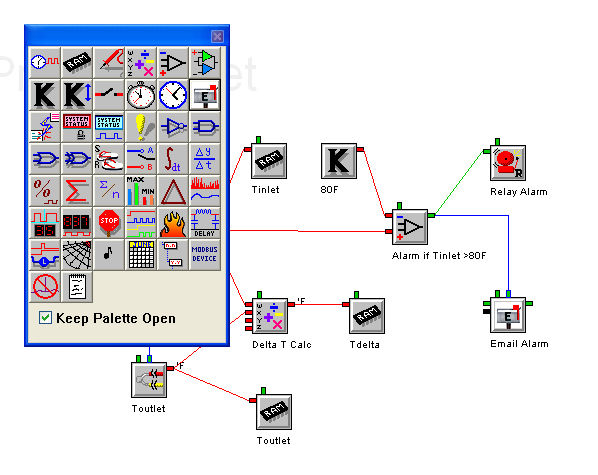
Programming Window
Drag and drop, then interconnect function icons to implement basic to powerful data acquisition, reporting and alarming programs
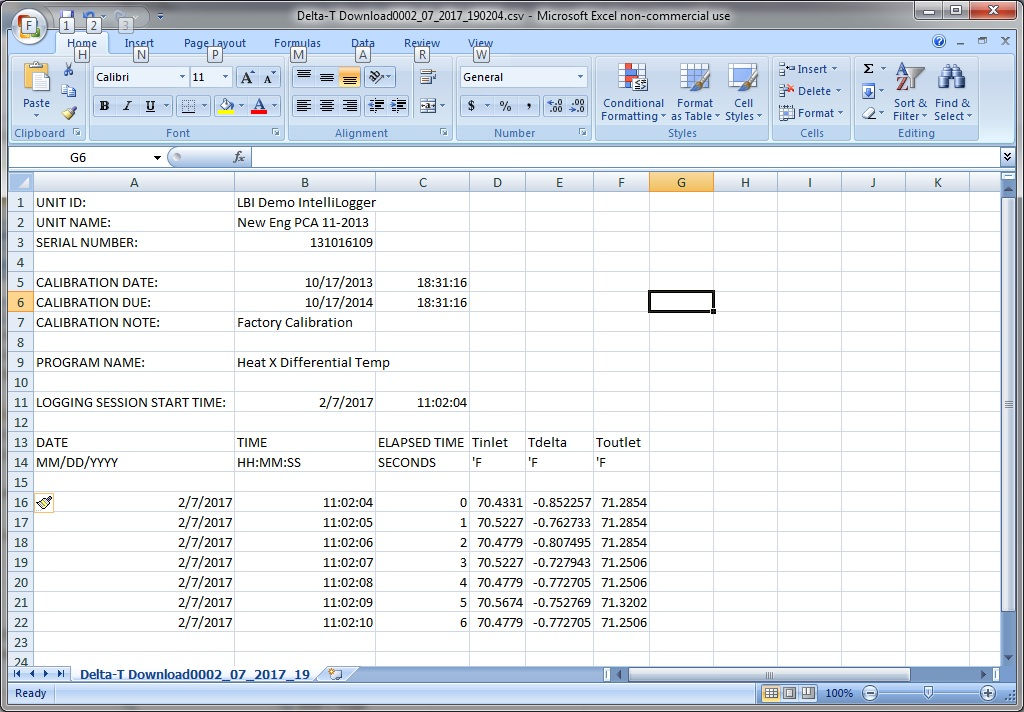
Logged Data Download to Spreadsheet
Simple download of logged data to CSV file. File can be opened by most data analysis applications such as Excel.
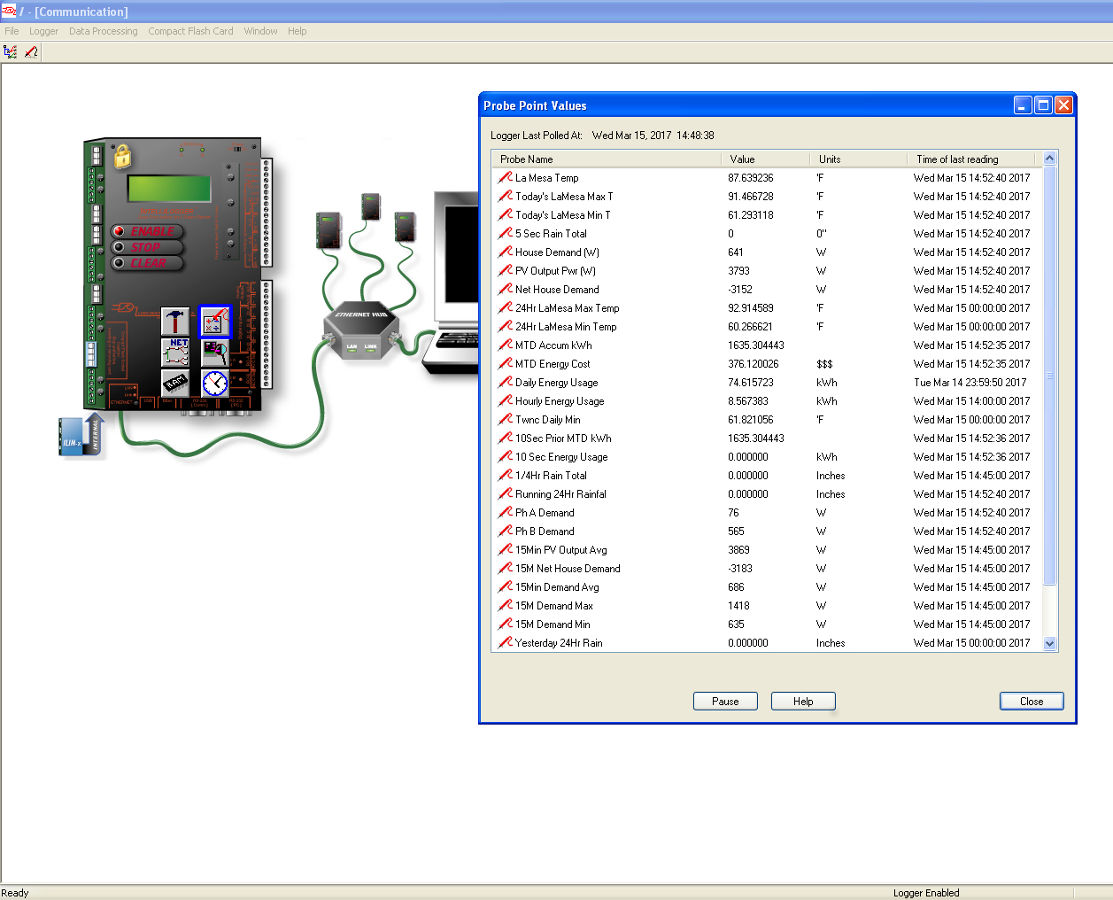
Quick Current Value Access
A single button click will display current input values, output states and calculated values from a connected IntelliLogger.
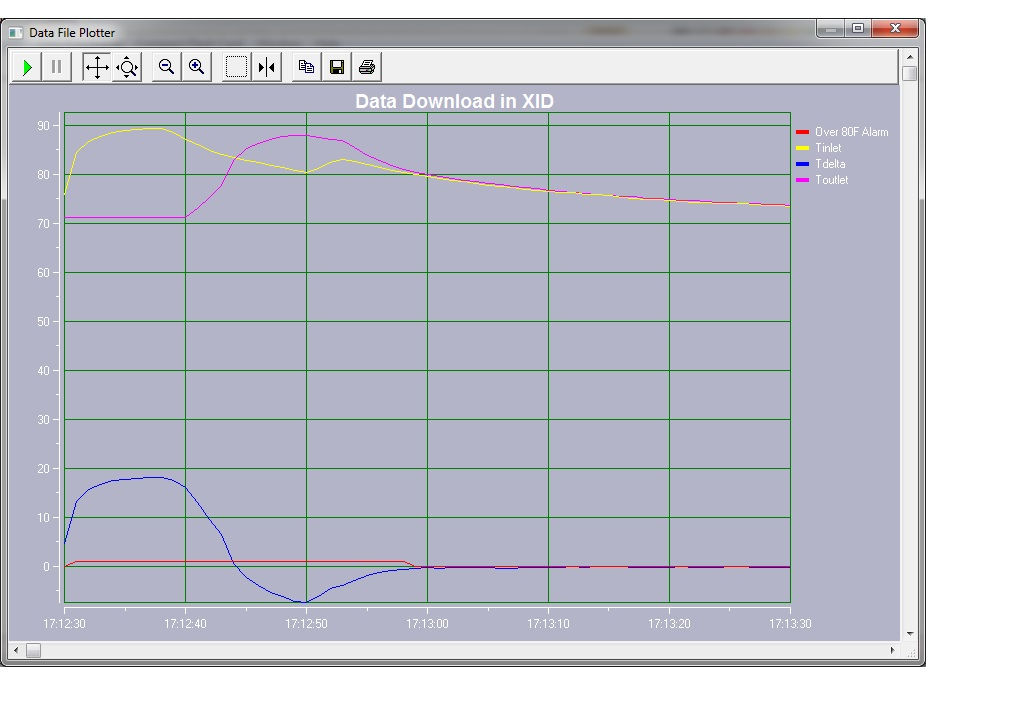
Logged Data Plotter
Full-featured, integral data plotter for quick presentation of downloaded data
Example HyperNet Application Programs
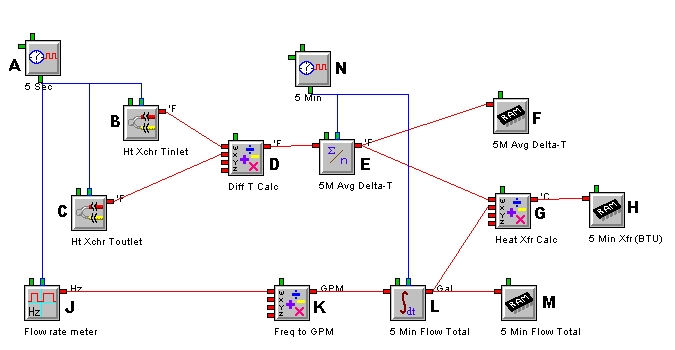
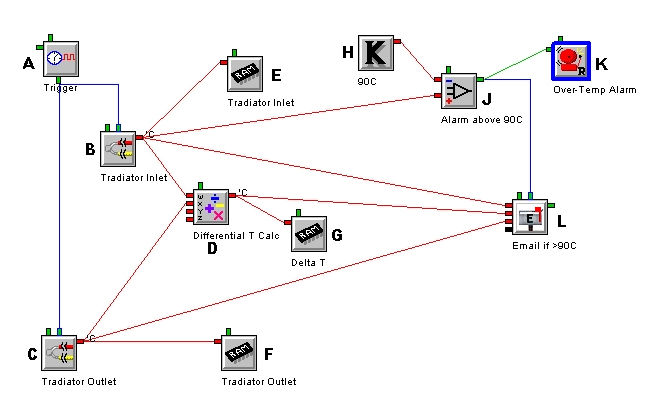
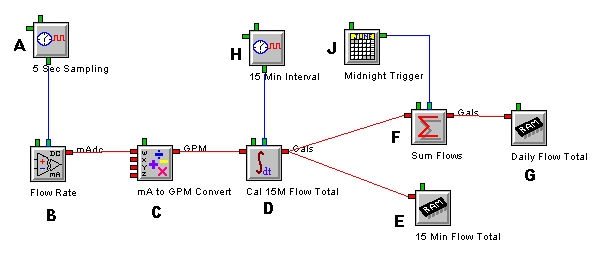
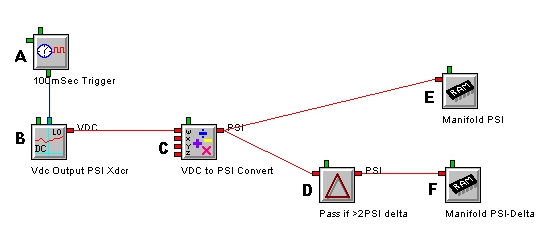
Powerful Features of HyperNet Programming
With the power of HyperNet™ programming, intelligent data acquisition methods can be simply implemented in the IntelliLogger™. By intelligently sampling and processing of readings as they are taken, the collected data file can be reduced to meaningful data only… resulting in reduced time spent in post-acquisition data reduction and processing.
Intelligent data acquisition methods easily implemented with HyperWare-II include:
Outputs and Automated Reporting
In addition to the intelligent data acquisition flexibiltiy of HyperNets, IntelliLogger hardware outputs can be controlled. Digital, relay and analog outputs are all under control of HyperNet programming.
Modify IntelliLogger program execution remotely...
HyperNet programming also supports the use of Remote Control Switches and Constants allowing for user changes in Program Net execution while the program is executing. Via the Remote Constant, comparator (alarm) thresholds can be modified, equation constants can be updated and more. With the Remote Control Switch icon, outputs can be turned ON/OFF remotely, Program Net branches (for example alarm acknowledge, email alerts, etc) can be disabled/enabled.
Data volume reduction schemes
Logging sampled inputs only upon change using the Delta icon. Monitor a signal quickly but only log to memory if it changes by some user defined amount since last logged. This feature is extremely valuable for data volume reduction when monitoring signals that are mostly stable with occasional transient action.
Powerful automated math calculations
Perform powerful math on incoming signals for units conversion as well as inter-channel calculations. Algebra to Integration and Derivatives.
Conditional Logging
Monitor inputs but only log to memory when certain conditions are met on that channel or other channels. For example, only when the engine is ON or the oil pressure is above 40PSI or the Inlet to Outlet heat exchanger differential exceeds 20C, etc.
Statistical data reduction on the fly
Min, Max and Averaging as well as filtering via Digital Signal Processing.
Powerful suite of Icons for building simple to complex data acquisition, alarming and reporting programs

Palette of Function Icons

Query Instrument Inputs
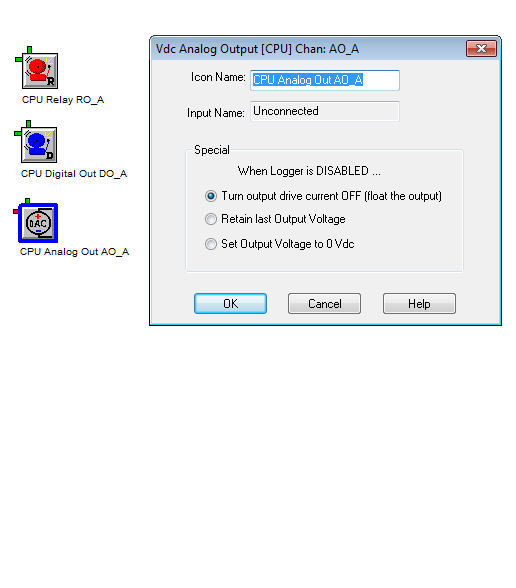
Query Instrument Outputs
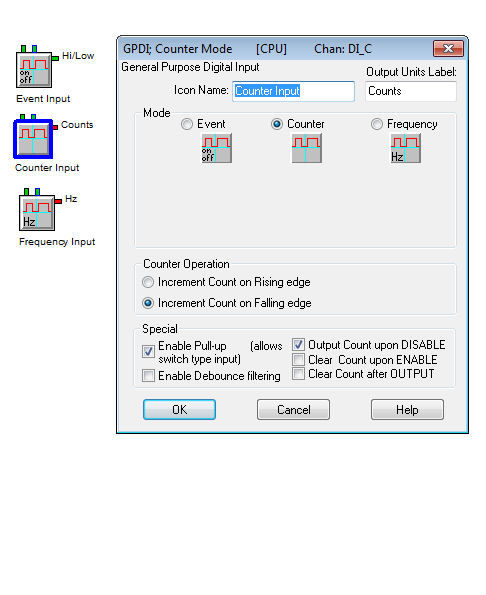
Query Instrument Digital Inputs
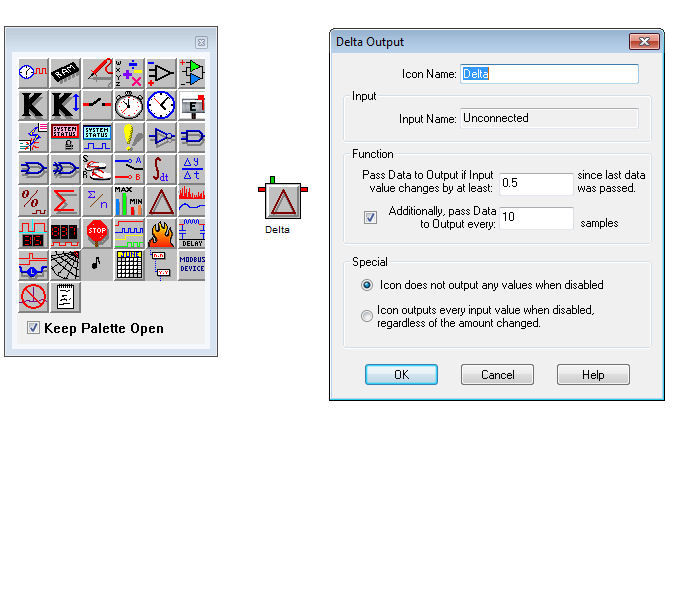
Log Only on Change with Delta Icon
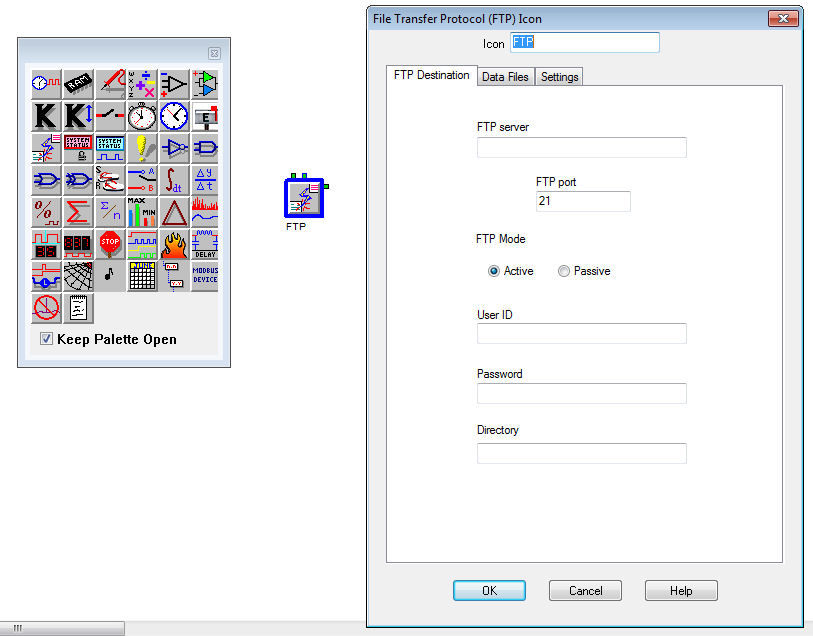
Automatic FTP’s of Data
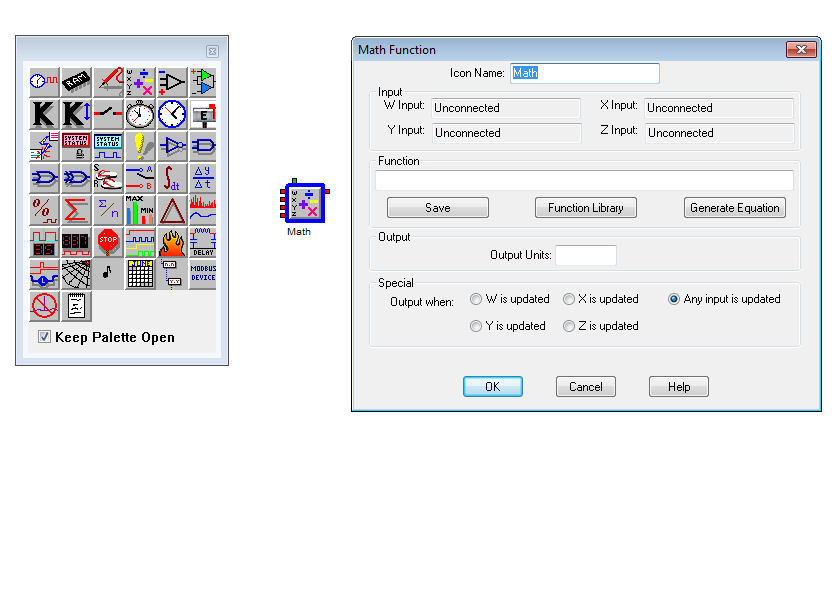
Powerful Calculations with the Math Icon
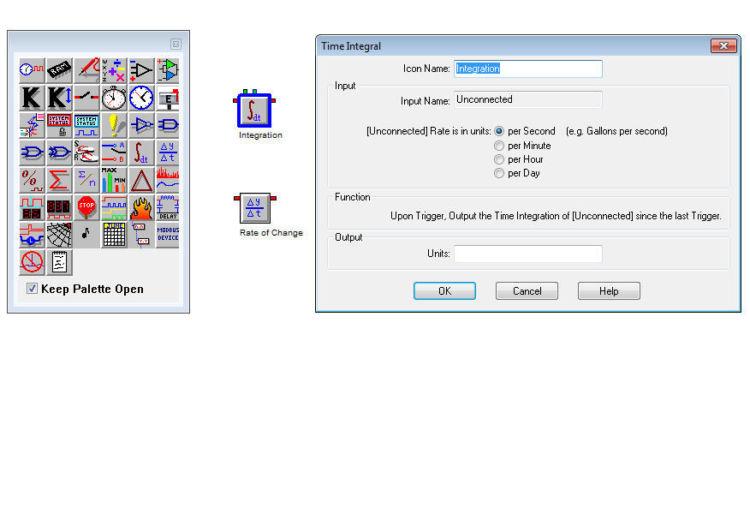
Integral and Derivative Calculations

Acquire Values from Modbus Slave Devices
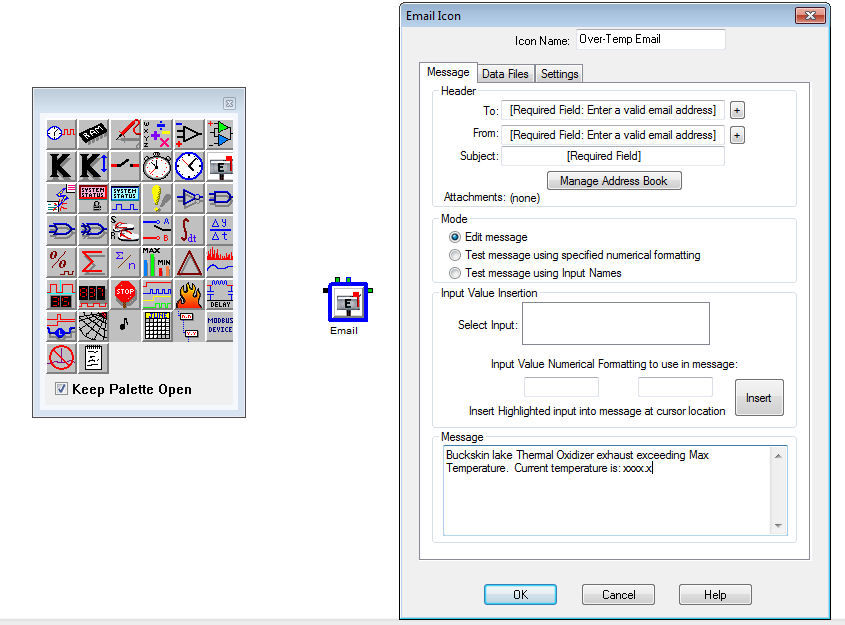
Send Emails with Embedded Values
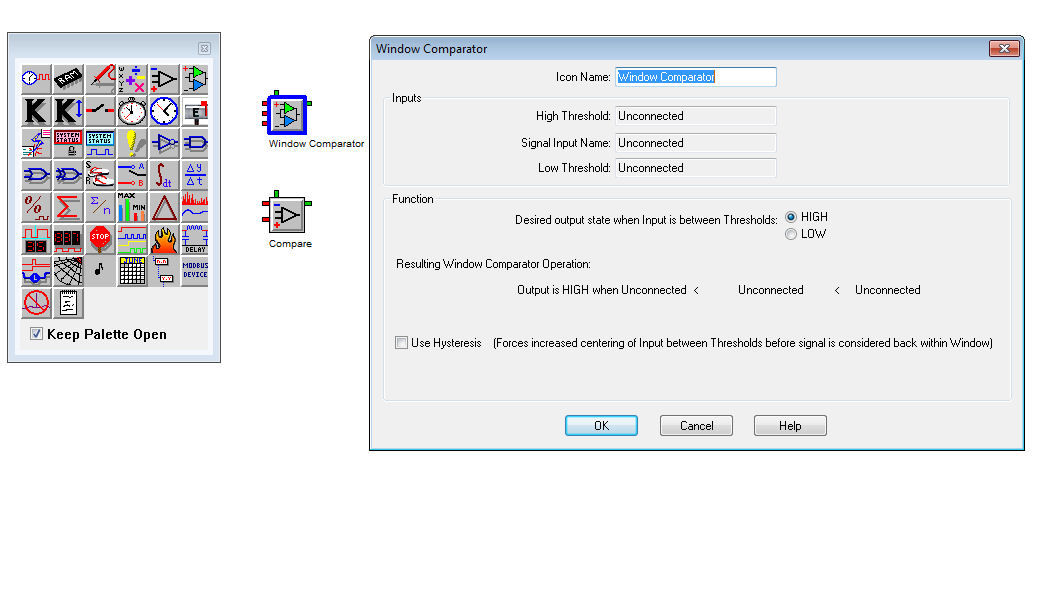
Perform Set-Point Comparisons for Alarming and Triggers
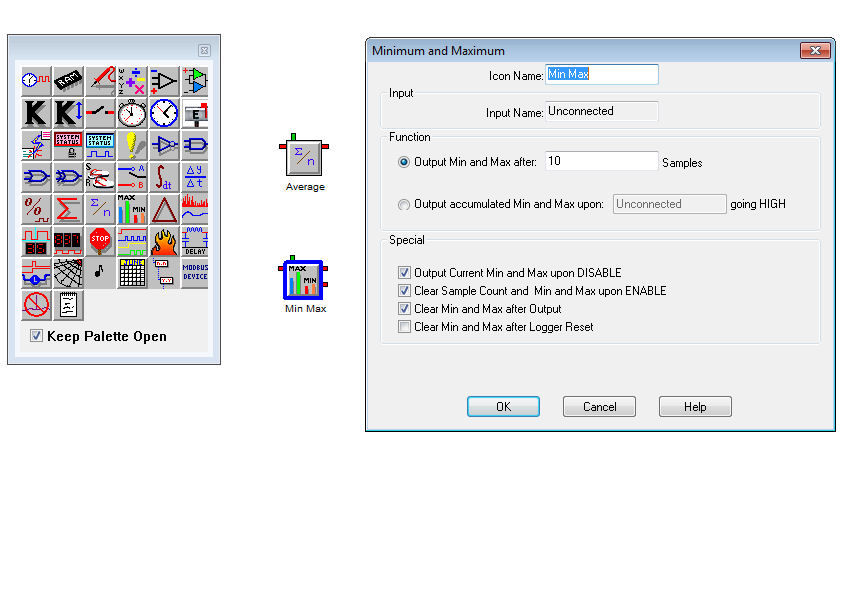
Perform Min-Max-Averaging

Schedule Events on Date and Time
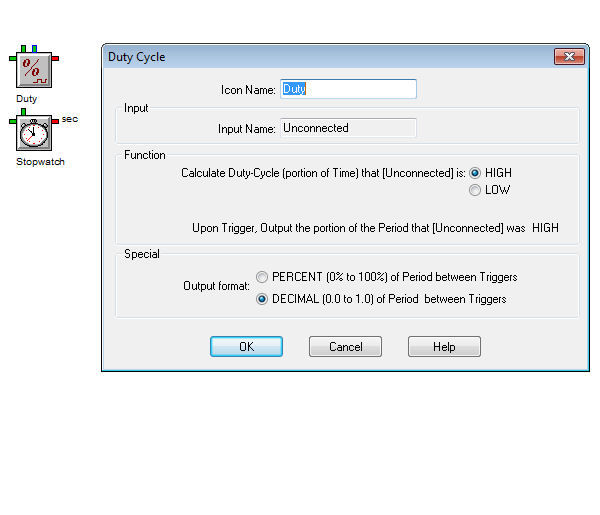
Calculate Run-Time and % On/Off Loading
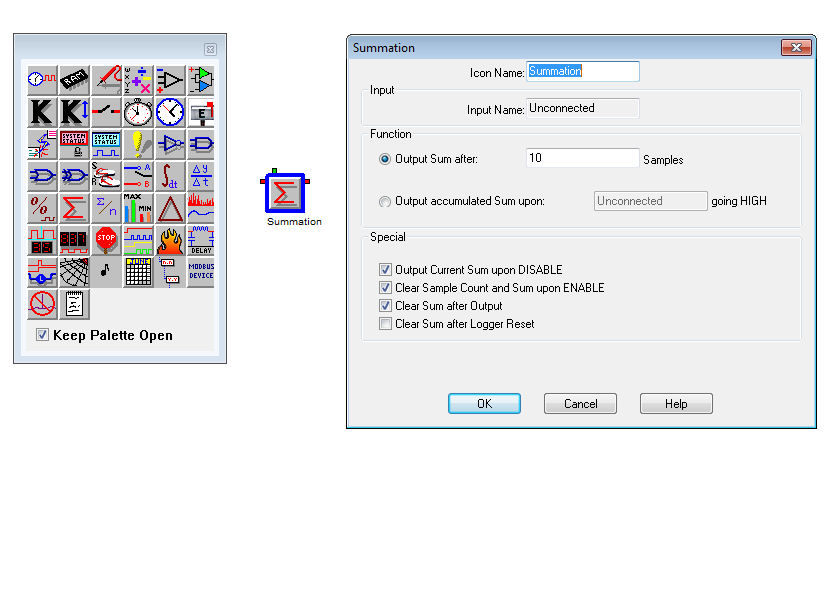
Totalize with Summing Icon
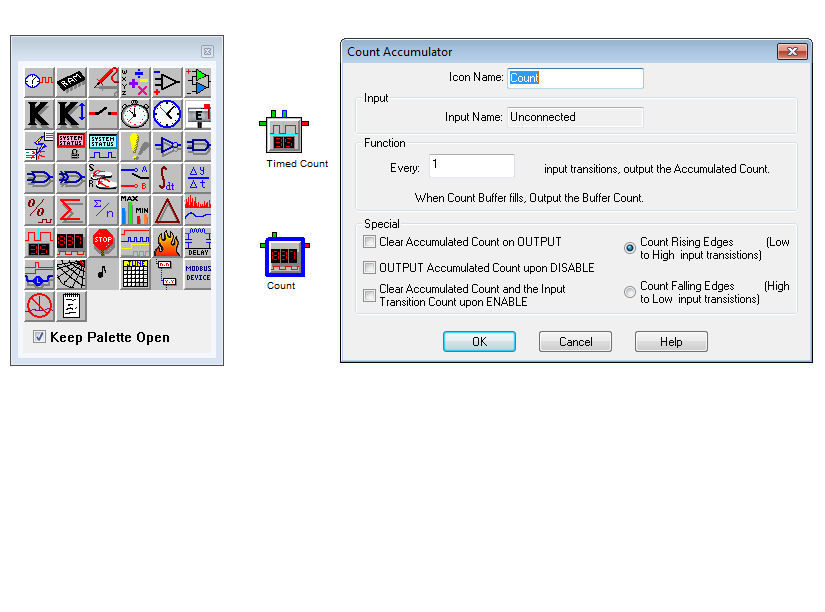
Accumulate Input Count Totals